TCP利器tcp-brutal
Loading image...
Please wait a moment
Retry 0
![db22f7c358a48f2319d9f82ef978d824]()
PNG
🖼️
Failed to Load Image
Unable to load the image. Please check your connection.
 1
 2
 3
 4
 5
 6
 7
 8
 9
10
11
12
13
14
15
16
17
18
19
20
21
22
23
24
25
26
27
28
29
30
31
|
cat > /etc/sysctl.conf << EOF
fs.file-max = 6815744
net.ipv4.tcp_no_metrics_save=1
net.ipv4.tcp_ecn=0
net.ipv4.tcp_frto=0
net.ipv4.tcp_mtu_probing=0
net.ipv4.tcp_rfc1337=0
net.ipv4.tcp_sack=1
net.ipv4.tcp_fack=1
net.ipv4.tcp_window_scaling=1
net.ipv4.tcp_adv_win_scale=1
net.ipv4.tcp_moderate_rcvbuf=1
net.core.rmem_max=33554432
net.core.wmem_max=33554432
net.ipv4.tcp_rmem=4096 87380 33554432
net.ipv4.tcp_wmem=4096 16384 33554432
net.ipv4.udp_rmem_min=8192
net.ipv4.udp_wmem_min=8192
net.ipv4.ip_forward=1
net.ipv4.conf.all.route_localnet=1
net.ipv4.conf.all.forwarding=1
net.ipv4.conf.default.forwarding=1
net.core.default_qdisc=fq
net.ipv4.tcp_congestion_control=bbr
net.ipv6.conf.all.forwarding=1
net.ipv6.conf.default.forwarding=1
EOF
sysctl -p && sysctl --system
|
net.ipv4.tcp_congestion_control=bbr or net.ipv4.tcp_congestion_control=cubic or net.ipv4.tcp_congestion_control=brutal
项目地址: https://github.com/apernet/tcp-brutal
论坛帖子: https://www.nodeseek.com/post-505403-1
Loading image...
Please wait a moment
Retry 0
![c2a110f6ca92e4acac7475afdeb842c8]()
PNG
🖼️
Failed to Load Image
Unable to load the image. Please check your connection.
1
2
3
4
|
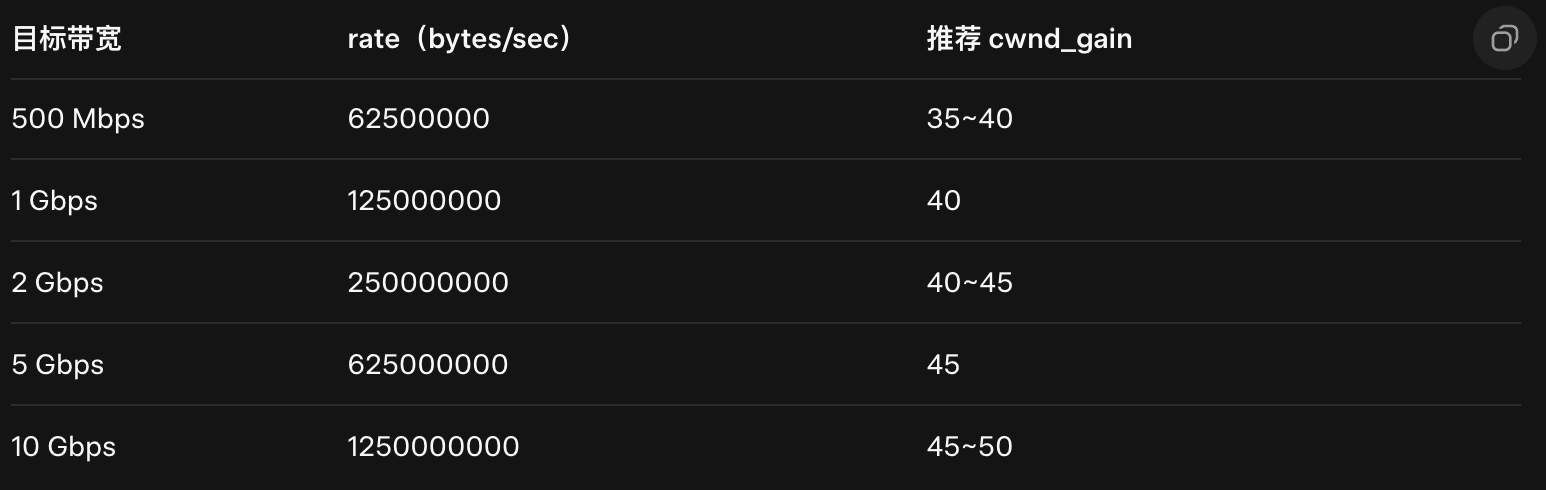
#define INIT_PACING_RATE 75000000 // 500 Mbps+
#define INIT_CWND_GAIN 40
|
重新编译 tcp-brutal
 1
 2
 3
 4
 5
 6
 7
 8
 9
10
11
12
13
14
15
16
17
18
19
|
root@racknerd-6bf1e7b:~/tcp-brutal# make
make -C /lib/modules/6.8.0-87-generic/build M=/root/tcp-brutal modules
make[1]: Entering directory '/usr/src/linux-headers-6.8.0-87-generic'
warning: the compiler differs from the one used to build the kernel
The kernel was built by: x86_64-linux-gnu-gcc-13 (Ubuntu 13.3.0-6ubuntu2~24.04) 13.3.0
You are using: gcc-13 (Ubuntu 13.3.0-6ubuntu2~24.04) 13.3.0
make[1]: Leaving directory '/usr/src/linux-headers-6.8.0-87-generic'


root@racknerd-6bf1e7b:~/tcp-brutal# insmod brutal.ko

root@racknerd-6bf1e7b:~/tcp-brutal# lsmod |grep brutal
brutal 16384 56

sysctl net.ipv4.tcp_congestion_control
sysctl -w net.ipv4.tcp_congestion_control=brutal #设置
sysctl -w net.ipv4.tcp_no_metrics_save=1 #切流量
|
总体感受没有那么长时间的缓冲了,可以瞬间提高速度到最大速度,秒开8K youtube视频。